
PDXpert PLM Software
Product Lifecycle Management
Replace your Excel BOMs with professional bill of materials software
Excel spreadsheets might seem like a simple solution for managing bills of materials, but they quickly become a costly liability as your product complexity grows. Here's why professional PLM software is essential for accurate, efficient BOM management.
Are you finding Excel bill of materials spreadsheets too painful?
New companies often begin their path to product lifecycle management software by looking for Excel bill of material spreadsheets. These BOM spreadsheet templates are easy to create, and can be useful for a short period.
However, after you have several Excel BOM spreadsheets, you'll begin to see the complexity and expense of maintaining them. And the risk of costly production errors rises significantly as your collection of bill of materials spreadsheets grows.
⚠️ The Critical Problem
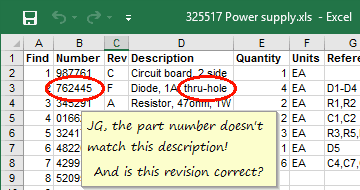
Excel bill of material spreadsheets can't enforce product data accuracy. You're working with bits of data, not a consistent part object. One cell is pretty much the same as any other cell. Each element of part data must be entered over and over again. It's far too easy to create duplicate or enter invalid part numbers.
Every worksheet cell is a never-ending source of potential — and often very expensive — errors.
Managing multi-level indented Excel BOMs is virtually impossible
Multi-level BOMs are incredibly useful, but Excel fights you at every step. For example, consider an automobile's electric window motor assembly, common to 4 door locations. Listing these motor assemblies within the complete product structure requires you to manage 4 identical lists, one for each door assembly. And if the motor assembly has subassemblies, or is used across many products, imagine the time and effort wasted in finding and updating a single component.
Design files? Revision control? Not in Excel!
Missing Critical Features
- ✗No history of who changed what, when, or why
- ✗No approved revision tracking
- ✗Tedious qualified supplier management
Practical Limitations
- ✗Impractical file attachments
- ✗Difficult part reuse across BOMs
- ✗Complex cost roll-up calculations
If you're using Excel to calculate product cost roll-ups, it's not easy maintaining part unit costs except for very basic assemblies. And it's essentially impossible to record substance content for RoHS and WEEE material declaration reporting. Excel simply can't structure the detailed data that should be associated with each part.
Specialized bill of materials capabilities in PDXpert PLM software
"PDXpert makes finding the interrelationship between all of our parts effortless, including our Suppliers' part numbers."
PDXpert PLM software is specifically designed to avoid the time, effort and errors of Excel BOM spreadsheets.
Data Integrity
- ✓Prevent duplicate part numbers with assignment rules
- ✓Instantly update all parent BOMs upon release
- ✓Complete revision history with audit trail
Productivity Features
- ✓Free-form text search to locate parts
- ✓Drag and drop complete parts onto BOMs
- ✓Where-used lists for impact analysis
Advanced Capabilities
- ✓Multi-level indented BOMs with cost roll-ups
- ✓Unlimited supplier sources with rankings
- ✓User access controls for unreleased items
Integration & Export
- ✓Attach design files directly to database items
- ✓Export to PDF and Excel for partners
- ✓Professional software with ongoing support
See PDXpert in Action
Watch how fast and easy bill of material management can be! Or, for more details and screen images, see PDXpert PLM's structure management features.
Let PDXpert PLM software replace your Excel bill of material spreadsheets
PDXpert PLM has been specifically designed for smaller organizations making the transition to automated product structure management. It's easy for users to find their items using free-form text search, then create complex products by simple drag-and-drop BOM construction.
Ready to upgrade from Excel spreadsheets?
- →Discover the valuable benefits of adopting a PLM software solution
- →Download a free, fully-functional trial of PDXpert PLM software
- →Review PDXpert PLM's affordable license options
- →Contact us to answer your questions
Excel BOM Risks
- ⚠️Expensive production errors
- ⚠️Time-consuming maintenance
- ⚠️No audit trail or control
PDXpert Benefits
- ✅Error prevention & data integrity
- ✅Automated BOM management
- ✅Complete revision control