PDXpert PLM Software
Product Lifecycle Management
PDXpert PLM software: Part management
At a glance
Rich part records—without losing control of categories, revisions, or files
PDXpert treats each part as a governed object: type-specific fields, numbering rules you define, lifecycle and revision discipline, attachments with check-out/in, materials for compliance roll-ups, and where-used / change visibility across the BOM.
Categories & numbering
Flexible part types, templates for descriptions, and auto- or manual numbering with prefixes, suffixes, and skip rules.
Lifecycle & files
Phases, pre-production vs production revisions, unlimited attachments, and controlled edits.
Compliance & integration
Materials / RoHS-style reporting, tasks toward release, custom attributes, and exports for downstream systems.
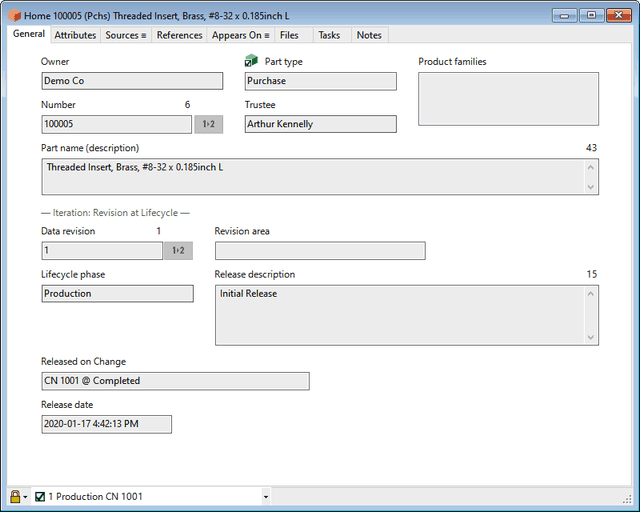
Part definitions are the heart of any PLM system. PDXpert PLM lets you create a virtually unlimited number of part categories, custom part numbering formats, and — in addition to the extensive set of standard properties — your own custom attributes.
- ✓Create a virtually unlimited variety of part categories, each with their own configured and custom properties
- ✓Define item numbers up to 70 alphanumeric characters with prefix, sequentially-assigned base, suffix and skip characters
- ✓Specify text templates that guide users how to describe parts using your preferred part name format
- ✓Manually or automatically assign data record revisions, using separate preproduction and production revision sequences
- ✓Manage inventory commitment using lifecycle phases
- ✓Attach any number of files to a part; check-out/-in files for modifications without conflicts
- ✓Define part materials and report the results for RoHS/WEEE
- ✓Identify and assign tasks necessary to prepare the item for release
- ✓Research the assemblies where a component is used, which components are sourced from the current item, and all change forms where a part record was released, canceled or otherwise affected
- ✓Create custom attributes including numeric, text, date and Boolean values, with or without units of measure, or apply members of a collection
- ✓Export your parts list to downstream manufacturing systems in a variety of text-based formats including XML, CSV, tab-delimited, etc.