
PDXpert PLM Software
Product Lifecycle Management
Designing an Access bill of materials database? Watch out...
Developing your own Microsoft Access bill of materials management software is certainly attractive. After all, you just want a list of parts and quantities, right? And isn't this a perfect use of Microsoft Access or other inexpensive desktop database?
Probably not.
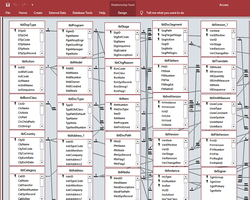
Internally-developed BOM databases can become enormously expensive. Your users will demand more features, and you'll be spending your time developing and managing your system. Compare the cost of your time with an affordable PLM system: you'll discover that our professionally-developed software is far more cost-efficient.
Because you'll also want to:
- Search for items across various data properties, regardless of what bill of material they appear on
- Auto-generate a part number according to its assigned item category
- Identify and exclude unreleased or obsolete parts from released bills of material
- Approve changes to your current bills of materials
- Maintain a version history of your bills of materials
- Attach electronic files to items on your BOM, including CAD files, procedures, specifications, quotes and website links
- Create multi-level bill of materials reports, consolidated parts lists, and cost/materials rollups
- Export bills of materials for your supply chain partners
- Manage material content to meet evolving recycling and disposal regulations
- Work within a modern user interface that lets you drag-and-drop partsand enjoy "nice to haves" like spellchecking
- Offer context-sensitive online user documentation and BOM best practice guidelines
- Add more users as your company grows, despite the very real limitations that Access imposes on simultaneous users
Creating a useful bill of materials database application is difficult and time-consuming, and requires the complete understanding of subtle business rules for revision control and change processing. How will you ensure the preceding revision is canceled when the new revision is released? Will new item revisions automatically replace canceled revisions? How are units of measure converted? Do your users want to attach design files and assembly instructions to items on the BOM? What's the best recursion routine for printing indented product structures? What performance can you expect from your Access bill of materials database as your company grows? Do you really want that phone call every time someone wrecks the permissions file?
What starts out as a "fun little project" quickly becomes a major distraction.
Fortunately, there's an easier way... Let our BOM database experts do it for you!
Our short video shows just how fast and easy bill of material management can be! Or, for more details and a screen image, see PDXpert PLM's structure management features.
PDXpert product lifecycle management (PLM) has been specifically designed to provide the following BOM management capabilities:
- Quickly find relevant items using powerful attribute search
- Easily drag-and-drop the most current data onto bill of material markups
- Instantly know an item's status (e.g., unqualified, qualified, obsolete)
- Work separately with current releases and proposed markups
- Enforce rules for each assembly type to ensure correct product structure contents
- Obtain insight into both assembly line-item costs and RoHS/WEEE materials lifecycle costs
- Retain a full audit trail of all changes to the bill of materials, including when and why it was changed, who approved the changes, how affected items were dispositioned, and the total recurring and non-recurring cost
- Navigate up and down the BOM hierarchy just by simple double-clicks
- Change system rules and configuration options without special programming
- Support system growth from a single user to hundreds of users with scalable Microsoft SQL Server
- Report and export product data for your supply chain partners in Adobe Acrobat PDF and Microsoft Excel XLS file formats
Yet, even though we've spent literally man-years making PDXpert PLM among the best bill of materials software, it's still a surprisingly affordable alternative to in-house BOM software development.
PDXpert PLM software can increase sales revenue through faster product releases; lower product costs by using more accurate BOMs; and reduce administrative overhead by providing important supporting information (like cost and material roll-ups) automatically.
- Increase revenue by slashing design time and accelerating release and change cycles
- Lower product costs by encouraging more collaborative design, reducing production errors and rework, and minimizing excess and obsolete inventory
- Reduce administrative overhead by simplifying regulatory and contractual compliance, and by reducing process administrative and clerical costs