
PDXpert PLM Software
Application Notes
Replacing item attributes using the Batch Importer tool
Use the Batch Importer tool to assign a new Trustee, custom attribute value, or other item-level attrubute to a set of parts or documents.
The primary purpose of the Batch Importer tool is to import parts, documents, BOMs, files and other starting values into your new PDXpert system.
However, even after your PDXpert system has been initialized, the Batch Importer tool is useful when you need to replace an item-level value on a set of documents or parts. Item-level attributes are those that are shared across all revisions of an item. They can be identified on theItemMaster import template as columns that show Updateable as Yes.
Review the Batch Importer andItem Master import topics. Back up your database. Do not update revision-level attributes on items that have been released.
Before importing changed data into your production system, it's a good idea touse a test system to validate the import file and review the results.
When an import value is empty, the new value may be empty, or assigned a default value, or not be changed. If you include empty cells in the import file, test that the values are assigned as you expect.
To update an item-level attribute, such as the Trustee, use this general procedure:
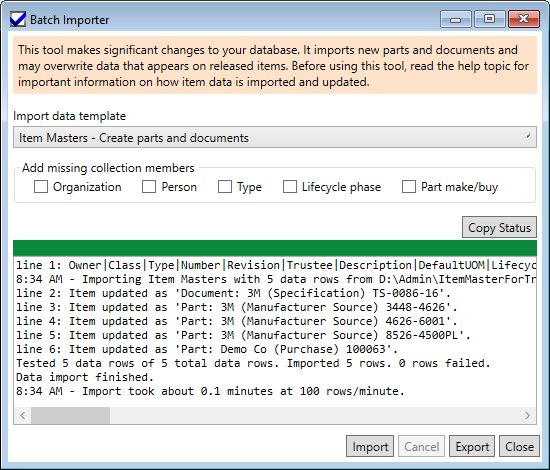
As an administrator, open the PDXpert client's Tools ➔ Batch Importer menu command.
Select the Import Type as Item Masters, then click the Export button, to export all existing parts and documents.
Open the saved ItemMaster.csv in a CSV plain text editor (or possibly Excel, if you're sure it won't automatically change your item data).
Delete all columns except the four item unique identity columns – that is, Class,Owner, Type, Number – and the attribute that you want to update; for example, the Trustee column.
Sort, filter or otherwise find all rows that you want to change. Delete all rows that you don't want to change.
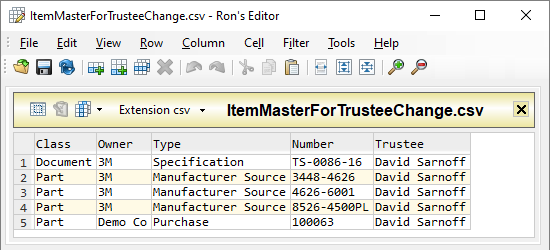
Replace the previous value with a new value. You can assign each row a different value.
In our example, the new Trustee value must exactly matchan existing member of the Persons collection.
Save the file.
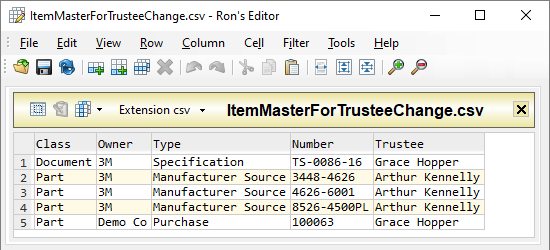
Import the saved ItemMaster.csv file.
For information about importing the item-level Materials andItem Files lists, see the related Batch Importer help topics.
This application note was relevant to the PDXpert software release that was current at time of publication. Product changes since that time may affect its utility. We'd be happy to assist you in assessing the applicability of this note to your situation.