
PDXpert PLM Software
On-line Help Guide
This help topic describes the current PDXpert PLM release. Earlier releases may be different. To view your release's version of this topic, open PDXpert and press the F1 key or select the Help menu.
Revise a released document
The document record's iteration must be released or canceled before you can make a new pending iteration.
Any user who has permission to view a document (and whose role has appropriate permissions) can make a new iteration for that document, regardless of the previous iteration's trustee.
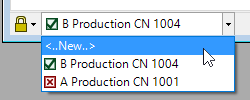
Click on the iteration dropdown list on the document window's status bar, and select the <..New..> line.
You don't need to unlock the existing record iteration to create a new iteration. The record is unlocked automatically.
Complete your new document iteration:
Some data — such as Type, Owner and Number — is locked on the first iteration, and cannot be revised.
- Fill in the new document iteration
- Add a reference item
Attach a revision file,attach an item file, orattach an external link
When you've completed the new iteration,release your document on a change form.
1070