
PDXpert PLM Software
On-line Help Guide
This help topic describes the current PDXpert PLM release. Earlier releases may be different. To view your release's version of this topic, open PDXpert and press the F1 key or select the Help menu.
Document form
A single document is shown in a Documentform.
At a minimum, a document consists of an owning organization that's responsible for its technical content, document type, document number, title, technical content revision and business lifecycle.
Since documents may be physically managed and distributed, you can specify the media or storage location of the document.
Most documents are CAD, images, and text files, and thus you can attach computer files to the document record'sFiles lists.
The document class icon shows the most recent iteration's release status:
 Pending
 Released
 Canceled
You can drag the icon and drop it onto a destination, such as a different item's markup list or a change form's affected list.
The form always opens the released iteration. If the document doesn't have a released revision, the pending iteration is opened. If there's no pending iteration, then the most recent canceled iteration is opened.
The status bar controls let you:
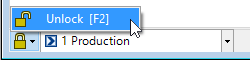
Unlocked the form for editing using the Lock/Unlock selection. Locking the window automatically saves any changes.
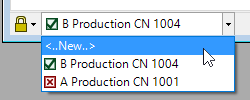
Select an iteration using the dropdown box. Each iteration shows its current release state (pending, released, canceled) as an icon; its revision and lifecycle; and the executing change form that released it.
 Pending
 Released
 Canceled
Iterations in the list are shown with most recent first, and the oldest last.
Make a new pending iteration by selecting <..New..> from the list. This option is not shown if the document has a pending iteration.
1007