
PDXpert PLM Software
On-line Help Guide
This help topic describes the current PDXpert PLM release. Earlier releases may be different. To view your release's version of this topic, open PDXpert and press the F1 key or select the Help menu.
Save your document
Saving a document clears all of the undo history; you can't undo any steps before the save operation.
Select Save (or Save All) from the Item menu; or,
Select Lock Object from theEdit menu (or press your keyboard'sF2 key); or,
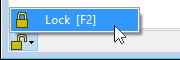
Lock the document form using the Lock selection in the form's status bar; or,
Close the document window, which saves all changes automatically.
PDXpert may show Cannot save or similar message when there is a conflict between the current database record and an earlier version. This conflict is often the result of assigning duplicate item identifiers or editing related records in parallel. For example, if you add a reference document to an item, the system must update both item records; the update is blocked when both records are unlocked.
When you see Cannot save, close all item forms and then open the item that you want to edit.
To avoid this problem, edit only one item at a time. When you're done editing the record, save or close the item before working on a different item. This avoids database conflicts, and lets PDXpert understand how to save your changes.
1073